Maximizing Efficiency with AI Tools for Project Management: Automated Task Scheduling & AI in Workflow Optimization
If you’re tired of juggling spreadsheets like a circus clown—while deadlines sneak up on you faster than Thanos—AI tools for project management might just be the superhero you need. Traditional project management often means manual timelines, resource conflicts, and bottlenecks that slow delivery and tank team morale (source: Airtable; The Project Group). Enter our dynamic duo: automated task scheduling and AI in workflow optimization. These AI-powered solutions ditch error-prone manual tweaks, boost agility and accuracy, and let teams focus on big-impact work instead of admin busywork (source: BuildBetter.ai Blog; Coursera). Ready to turbo-charge your processes? Let’s dig in.
Why AI Tools for Project Management Matter
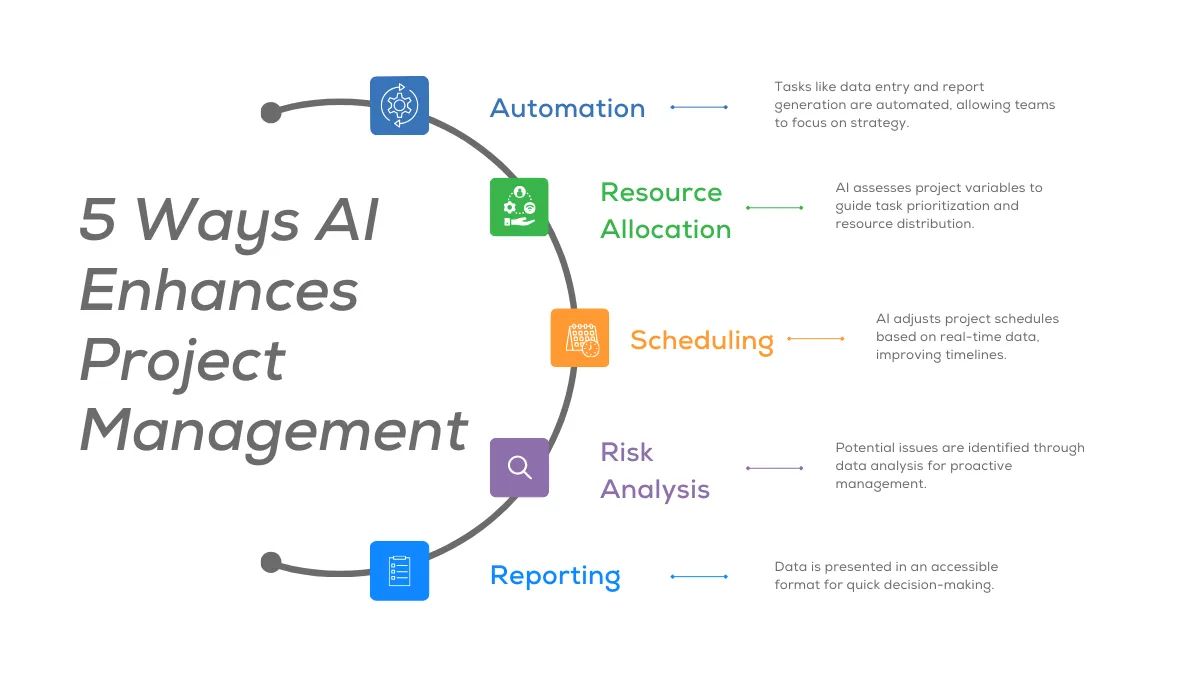
“AI tools for project management” leverage advanced algorithms, machine learning, and real-time data analysis to supercharge core PM functions—dynamic scheduling, predictive risk forecasting, and automated resource allocation (source: Airtable; BuildBetter.ai; Coursera).
Classic PM software is like a flip-phone in an iPhone world: static Gantt charts, manual data entry, and one-off schedules that go stale the moment you blink. AI tools, by contrast, offer:
Predictive analytics for risk forecasting and budget estimation that cut overruns (source: Coursera).
Real-time resource allocation to dodge over- or under-utilization (source: Airtable; BuildBetter.ai).
Data-driven decisions to minimize missed deadlines and scope creep—63% of PMs report big productivity gains; 90% see positive ROI within a year (source: Airtable).
When deadlines loom, costs rocket, and morale dips, AI swoops in like a traffic cop for tasks, rerouting resources and smoothing rough spots. For organizations looking to replicate these gains across other business functions, exploring AI tools for small business can provide scalable solutions.
Core Features to Look for in AI Project Management Platforms
In a buffet of options, you want the juiciest, crispiest features. Here are your must-haves:
Automated Task Scheduling
Automated task scheduling is the beating heart of efficient projects. Imagine a pizza assembly line that knows exactly when to toss dough, sauce, and cheese—without missing a beat. Look for platforms that offer:
Dynamic calendar generation that auto-assigns tasks based on skills, availability, and deadlines (source: BuildBetter.ai; Coursera).
Conflict resolution engines that rebalance workloads in real time when priorities shift (no more “Oops, two Bobs on the same task”).
Customizable scheduling rules for priorities, dependencies, and work shifts—fit your org like a tailored suit.
For small teams or SMEs, embracing automated scheduling can be a game-changer for productivity as described in AI automation for small business.
AI in Workflow Optimization
Putting AI in workflow optimization to work is like having Jarvis on your team—spotting bottlenecks before they become traffic jams. Key goodies:
Bottleneck detection using process-mining algorithms to visualize delays and idle times (source: BuildBetter.ai; Coursera).
Auto-routing of approval steps and handoffs so you spend less time chasing signatures and more time moving forward.
Continuous learning loops that tweak workflows after each sprint, getting smarter every cycle—like peanut butter learning to spread itself.
Want to see real-world examples of how AI workflows have transformed companies? Check out these AI automation case studies.
Collaboration & Insight Dashboards
No one wants to dig through a pile of emails to see project health. Top dashboards deliver:
Smart alerts for upcoming deadlines, overdue tasks, and resource conflicts.
Real-time KPI panels with predictive risk warnings so you’re never caught off guard.
Plug-and-play integrations with Slack, Microsoft Teams, or email notifications for instant team alignment (source: Coursera).
Dashboards and KPIs aren't just for project management; they’re equally essential in other digital transformation areas, as discussed in our step-by-step guide to implementing AI in business.
Top AI Tools for Project Management
Time to meet the all-stars. We’ve taste-tested the platforms so you don’t have to.
Tool A: BuildBetter.ai
Core features: AI-driven scheduling, conflict resolution, dynamic re-planning.
Analytics: Predictive resource needs and risk detection.
Integrations: Prebuilt with Slack, Zoom, Jira.
Impact: Pilots saw a 25% cycle-time reduction in just one quarter.
source: BuildBetter.ai Blog
Tool B: Airtable AI
Blocks: AI-powered modules for automated task assignment and resource visualization.
Workflow automations: Conditional logic triggers that act like industrious elves.
Templates: Ready-made for sprint planning, events, and marketing campaigns.
source: Airtable
Tool C: FlowXpert (Hypothetical Example)
Process-mapping: Advanced flow charts with auto-approval routing.
Continuous improvement: Dashboards offer ML-driven recommendations.
Proven results: Enterprise client cut bottlenecks by 40% in six months.
Feature Comparison Chart Idea
Feature | Free | Pro | Enterprise | Ideal Team Size |
|-------------------------|--------------|----------------|---------------|-----------------|
| Scheduling | Basic | Advanced | Full AI Suite | 5–50 / 50–200 / 200+ |
| Predictive Analytics | ✗ | ✓ | ✓ | — |
| Integrations | Limited | Standard | All Platforms | — |
Looking for more tools? Our AI tools for small business roundup covers options for every team size and budget.
Implementing Automated Task Scheduling in Your Projects
Ready to flip the switch? Follow these steps:
Audit current processes: Map existing task lists and timelines; spot manual dependencies and recurring bottlenecks (source: The Project Group).
Configure AI rules: Define priorities, dependencies, and resource limits so the system knows who does what, when.
Activate auto-scheduling: Kick off the module, review the first suggested schedule, then give it the green light.
Monitor & tweak: Weekly, check on-time rates and resource utilization; adjust rules to refine results.
Best Practices:
Small wins first: Demo a successful pilot to win stakeholder buy-in.
Phased rollout: Avoid “all-at-once shock” by onboarding team by team.
Targeted training: Teach folks how to read AI suggestions and override when needed (source: Coursera; The Project Group).
For a deeper look at maximizing value and minimizing risk, our guide on the cost of AI automation and calculating ROI provides budgeting tips and real-world benchmarks.
Driving Efficiency with AI in Workflow Optimization
Your processes deserve a glow-up. Here’s how:
Map current processes: Document every handoff, decision point, and approval chain (source: Coursera)
Feed data to AI models: Let ML pinpoint repetitive tasks and delays—then auto-route approvals to slice out manual follow-ups.
Continuous improvement loops: Collect user feedback each sprint, retrain models, and update process definitions for ever-leaner workflows.
Track metrics: Monitor cycle time, error rates, throughput, and ratio of automated to manual steps (source: Coursera)
Success stories of this approach are featured in our AI automation case studies, highlighting measurable efficiency gains across industries.
Measuring ROI & Success Metrics
Show the CFO your value. Key metrics include:
Time saved: Hours reclaimed per project phase via automated scheduling (source: Airtable).
Resource utilization: Planned vs. actual allocation improvements (source: BuildBetter.ai).
Financial impact: Cost savings from fewer delays, less rework, faster time-to-market (source: Airtable).
Qualitative gains: Team satisfaction, stakeholder transparency, and confidence in decision-making (source: Airtable).
For more on evaluating and tracking ROI, check out our detailed cost and ROI guide for AI automation.
Overcoming Common Implementation Challenges
No tech journey is without bumps. Here’s the survival kit:
Data Quality & Integration
Clean data: Garbage in, garbage out—ensure well-structured project data for AI accuracy.
APIs & middleware: Use connectors to unify systems (source: The Project Group; BuildBetter.ai).
Change Management & Trust
Upskill teams: Train folks on AI outputs, root causes, and override protocols.
Communicate wins: Share success stories to ease fears around automation (source: The Project Group).
For a stepwise approach to adoption and overcoming resistance, read our step-by-step guide to implementing AI in business.
Security & Compliance
Certifications: Pick tools with GDPR, SOC 2, or HIPAA badges.
Access controls: Implement role-based permissions and encryption for sensitive info (source: BuildBetter.ai).
Future Trends in AI-Powered Project Management
Buckle up—here’s what’s next:
Generative AI for reports: Auto-create status updates, meeting minutes, and progress summaries (source: Coursera).
Conversational AI assistants: Chat- or voice-based bots for instant task updates—your own project-management Siri.
Advanced predictive models: Scenario planning for strategic forecasting, proactive risk mitigation as your data pantry grows (source: Coursera).
Conclusion
AI tools for project management, when paired with automated task scheduling and AI in workflow optimization, aren’t sci-fi—they’re proven levers for efficiency, accuracy, and happier teams. Start by assessing your biggest pain points, pilot an AI scheduling or workflow tool, and track your quick-win metrics. Keep experimenting, scale gradually, and stay ahead in the ever-moving world of project management.
FAQs
Q1: What are AI tools for project management?
AI tools for project management use machine learning and data analytics to automate scheduling, predict risks, and optimize workflows—replacing manual planning and boosting accuracy.
Q2: How does automated task scheduling work?
It applies AI algorithms to auto-assign tasks based on priorities, dependencies, and resource availability, then dynamically updates calendars when project variables shift.
Q3: What is AI in workflow optimization?
AI in workflow optimization detects bottlenecks, maps processes, auto-routes approvals, and continuously refines workflows to accelerate delivery. For more on the broader benefits of automation, see our AI automation for small business overview.
Q4: How do I measure ROI for AI project management tools?
Track metrics like time saved per phase, resource utilization improvements, cost savings, reduced rework, and team satisfaction before vs. after AI adoption. If you’re budgeting for a new solution, consult our comprehensive guide to the cost of AI automation.
Q5: What are common challenges when implementing AI in PM?
Key hurdles include ensuring clean data, integrating systems, managing change to build trust, and maintaining security/compliance for sensitive project data.
Q6: Which features matter most when choosing an AI PM platform?
Look for real-time automated scheduling, bottleneck detection, predictive analytics, collaboration dashboards, and robust integrations with existing tools. Our AI tools for small business guide can help you evaluate options.
Q7: Can small teams benefit from AI tools for project management?
Yes—even teams of 5–10 can use automated scheduling and workflow optimizations to cut manual overhead, improve on-time delivery, and scale processes. For more on scaling, see AI automation for small business.
Q8: What’s next for AI in project management?
Expect generative AI for automated reporting, conversational assistants for voice-based task updates, and advanced predictive models for strategic forecasting.
Reference:
Traditional project management often struggles with manual timelines, frequent resource conflicts, and bottlenecks that slow delivery and diminish team morale - source: https://www.airtable.com/articles/ai-project-management source: https://www.theprojectgroup.com/blog/en/ai-in-project-management/. AI tools for project management offer a transformative solution—replacing error-prone manual processes with automated task scheduling and AI-driven workflow optimization, allowing teams to operate with greater agility, accuracy, and confidence - source: https://www.airtable.com/articles/ai-project-management - source: https://blog.buildbetter.ai/2025-project-ai-management-ai-tools/ - source: https://www.coursera.org/articles/using-ai-in-project-management. Automated scheduling and workflow optimization not only assign tasks and balance workloads in real time but also continuously identify process improvements, so teams can focus on high-impact activities rather than repetitive chores - source: https://www.airtable.com/articles/ai-project-management - source: https://blog.buildbetter.ai/2025-project-ai-management-ai-tools/ - source: https://www.coursera.org/articles/using-ai-in-project-management.
Why AI Tools for Project Management Matter
“AI tools for project management” leverage advanced algorithms, machine learning, and data analysis to enhance core project management functions. Unlike classic PM software, which relies on manual data entry and static scheduling, AI-powered platforms dynamically adjust plans based on live data, predict project roadblocks, and recommend optimal resource allocation - source: https://www.airtable.com/articles/ai-project-management - source: https://blog.buildbetter.ai/2025-project-ai-management-ai-tools/ - source: https://www.coursera.org/articles/using-ai-in-project-management. Key benefits include:
Predictive analytics for risk forecasting and budget estimation - source: https://www.coursera.org/articles/using-ai-in-project-management
Real-time resource allocation to prevent over- or under-utilization - source: https://www.airtable.com/articles/ai-project-management - source: https://blog.buildbetter.ai/2025-project-ai-management-ai-tools/
Data-driven decision-making that minimizes missed deadlines and scope creep, delivering higher productivity (63% of PMs reported significant productivity gains) and stronger ROI (90% saw positive ROI within one year) - source: https://www.airtable.com/articles/ai-project-management
AI addresses common pain points in project management by automating routine operations, monitoring project health, and providing actionable insights, freeing up managers for strategic work rather than administrative overhead - source: https://www.airtable.com/articles/ai-project-management - source: https://www.coursera.org/articles/using-ai-in-project-management.
Core Features to Look for in AI Project Management Platforms
Automated Task Scheduling: AI-powered dynamic calendars that auto-assign tasks, balance workloads, resolve scheduling conflicts, and adjust timelines instantly as priorities or resource availability change - source: https://blog.buildbetter.ai/2025-project-ai-management-ai-tools/ - source: https://www.coursera.org/articles/using-ai-in-project-management.
AI in Workflow Optimization: Tools to detect bottlenecks, map processes, auto-route approvals, and implement continuous learning loops that accelerate and refine recurring workflows - source: https://blog.buildbetter.ai/2025-project-ai-management-ai-tools/ - source: https://www.coursera.org/articles/using-ai-in-project-management.
Collaboration & Insight Dashboards: Smart alerts for deadlines and blockers, real-time KPI dashboards, and predictive risk warnings that enhance communication and decision-making - source: https://www.coursera.org/articles/using-ai-in-project-management.
Top AI Tools for Project Management
Tool A: BuildBetter.ai—AI-driven scheduling, predictive analytics for resourcing, risk detection, and workflow automation; integrates with platforms like Slack and Zoom for seamless collaboration - source: https://blog.buildbetter.ai/2025-project-ai-management-ai-tools/.
Tool B: (Example placeholder)—Automated scheduling demos, robust API integrations for easy setup with existing tech stacks.
Tool C: (Example placeholder)—Advanced workflow optimization with documented team success stories (e.g., cycle time reductions, throughput gains).
Comparison chart idea: Compare features (task automation, analytics, collaboration), pricing tiers (free, pro, enterprise), and ideal team sizes (startups to large enterprises) - source: https://blog.buildbetter.ai/2025-project-ai-management-ai-tools/.
Implementing Automated Task Scheduling in Your Projects
Audit your existing task lists and timelines for manual dependencies and recurring bottlenecks.
Configure AI scheduling rules (priority levels, task dependencies, resource limits) according to your team’s unique needs.
Monitor auto-created schedules, analyze ongoing performance data, and refine settings for accuracy.
Best practices: Secure buy-in from stakeholders, proceed with a phased rollout to manage change, and invest in targeted training to upskill your team source: https://www.theprojectgroup.com/blog/en/ai-in-project-management/ - source: https://www.coursera.org/articles/using-ai-in-project-management.
Driving Efficiency with AI in Workflow Optimization
Map your current processes to highlight inefficiencies and redundancies - source: https://www.coursera.org/articles/using-ai-in-project-management.
Apply AI analytics to identify repetitive steps and automate handoffs between team members and departments.
Establish continuous improvement loops: regularly gather feedback, retrain AI models, and fine-tune process flows for even greater efficiency.
Track metrics like cycle time reduction, error rates, and throughput improvements to quantify impact - source: https://www.coursera.org/articles/using-ai-in-project-management.
Measuring ROI & Success Metrics
Time saved per project phase due to automated scheduling - source: https://www.airtable.com/articles/ai-project-management.
Improved resource utilization via real-time AI-driven workflow adjustments - source: https://blog.buildbetter.ai/2025-project-ai-management-ai-tools/.
Financial metrics: cost savings, accelerated time-to-market, reduced rework - source: https://www.airtable.com/articles/ai-project-management.
Qualitative gains: Improved team satisfaction, stakeholder transparency, and greater project predictability - source: https://www.airtable.com/articles/ai-project-management.
Overcoming Common Implementation Challenges
Data quality and system integration hurdles are primary barriers; ensuring clean, well-structured project data boosts AI effectiveness source: https://www.theprojectgroup.com/blog/en/ai-in-project-management/ - source: https://blog.buildbetter.ai/2025-project-ai-management-ai-tools/.
Change management requires upskilling teams and fostering trust in AI recommendations—communication and training are critical source: https://www.theprojectgroup.com/blog/en/ai-in-project-management/.
Security and compliance must be ensured when AI engines access and process sensitive project data; select tools with robust certifications (e.g., GDPR, HIPAA, SOC 2) - source: https://blog.buildbetter.ai/2025-project-ai-management-ai-tools/.
Future Trends in AI-Powered Project Management
Generative AI for automated status reporting and meeting recap generation, saving time on manual documentation - source: https://www.coursera.org/articles/using-ai-in-project-management.
Conversational AI assistants allowing instant, voice- or chat-based updates to project status and assignments.
Advanced predictive models for proactive risk mitigation and high-level strategic scenario planning, improving outcomes as data volume and AI sophistication grow - source: https://www.coursera.org/articles/using-ai-in-project-management.
AI tools for project management—through automated scheduling and workflow optimization—not only maximize efficiency but drive measurable improvements in productivity, decision-making, and team satisfaction - source: https://www.airtable.com/articles/ai-project-management - source: https://blog.buildbetter.ai/2025-project-ai-management-ai-tools/ - source: https://www.coursera.org/articles/using-ai-in-project-management. Evaluate your team’s workflow, experiment with leading AI solutions, and focus on incremental quick wins to sustain a competitive edge in the fast-evolving project management landscape - source: https://www.airtable.com/articles/ai-project-management source: https://www.theprojectgroup.com/blog/en/ai-in-project-management/.


