Unlocking Efficiency with AI-Powered Customer Service: A Small Business Guide
Imagine running your support team like the Batcave—always alert, super-smart, and ready to swoop in immediately. That’s precisely what AI-powered customer service delivers. By combining chatbots, automation engines, and natural language processing (NLP), you get 24/7 responsiveness, speed, and personalization.
This guide dives into AI in customer support, highlights practical chatbot use cases for small businesses, and shows how to transform your help desk from a sluggish fax machine into a customer-pleasing powerhouse.
We’ll cover why small businesses need AI-powered customer service, unpack the core technologies, explore real-world applications, and walk through how to select, implement, and optimize the right solution. If you’re ready to stop drowning in support tickets and start delighting customers, let’s get started. For a broader look at AI in small business, visit AI Automation for Small Business (link to be inserted).
Why Small Businesses Need AI-Powered Customer Service
Small businesses face a David vs. Goliath challenge: limited staff versus customers expecting lightning-fast replies. Add weekend and midnight inquiries, and you have a recipe for burnout.
AI-powered customer service changes the game by:
Handling routine FAQs when your team is offline.
Using NLP to interpret slang, typos, and emoji-filled messages.
Providing instant responses to keep customers from jumping ship.
By 2025, 95% of customer interactions will be AI-driven, and businesses are reporting up to a 400% productivity boost—saving billions of work hours (Sobot). For more on AI productivity gains, check this guide (link to be inserted)
Core Components of AI-Powered Customer Service
Think of AI in customer support like baking the perfect cake: skip an ingredient, and you risk a disaster.
Natural Language Processing (NLP) – Understands everyday language, avoiding “error code” confusion.
Machine Learning for Intent Recognition – Learns customer patterns over time to anticipate needs.
CRM & Ticketing Integration – Fetches order history, updates records, and maintains context across channels (Sobot).
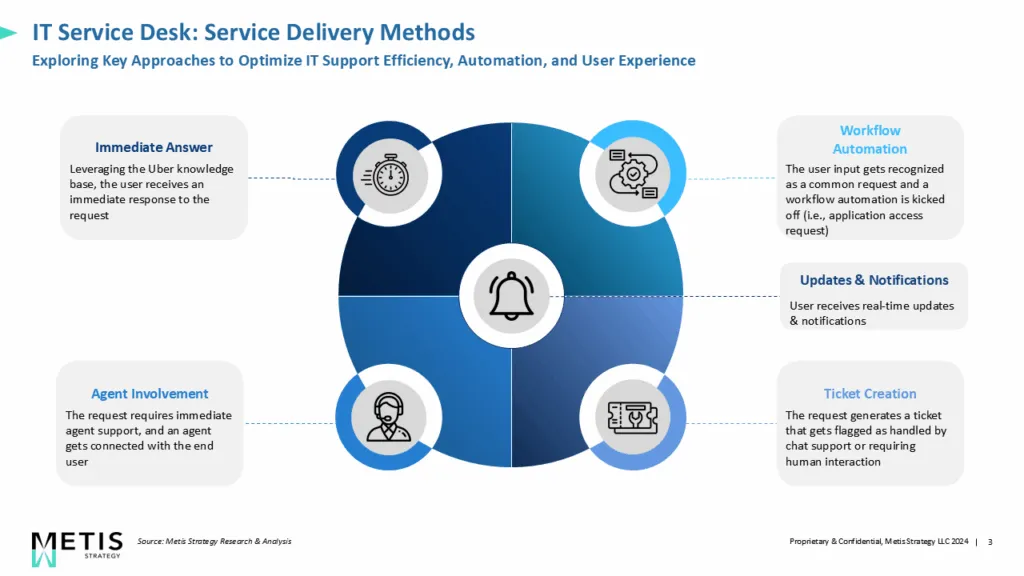
Automation Engine – Routes tickets, triggers notifications, and ensures nothing falls through the cracks.
For help selecting the right AI tools, see AI Automation for Small Business (link to be inserted).
Practical Chatbot Use Cases for Small Businesses
Today’s chatbots are far from the frustrating phone menus of the past. Modern bots can:
Qualify Leads & Book Appointments – Ask screening questions, capture details, and schedule meetings.
Handle FAQs & Self-Service Requests – Resolve common queries instantly (81% of customers prefer DIY support).
Provide Order Status & Process Returns – Offer quick updates and easy returns.
Escalate to Human Agents – Pass along the complete conversation history to avoid customer repetition.
For more success stories, check AI Automation Case Studies for SMEs (link to be inserted).
Key Benefits of AI in Customer Support
AI isn’t just a fancy add-on—it’s a strategic advantage:
Cost Savings – Reduce repetitive inquiries and staffing overhead.
Speed & Availability – 24/7 responses, even at 2 AM.
Consistency & Accuracy – Standardized answers that minimize human error.
Data Insights – Analytics reveal bottlenecks and customer needs.
To calculate ROI, visit the Cost of AI Automation Guide (link to be inserted).
Choosing the Right Solution
When evaluating chatbots for small businesses:
Ease of Setup – Decide between no-code tools or developer-driven solutions.
Multi-Channel Support – Cover web, email, social media, and SMS.
Feature Set – Weigh standalone bots versus full AI platforms.
Budget & Scalability – Look for usage-based pricing to match your needs.
See AI Tools for Small Business for a complete evaluation framework.
Implementation Roadmap
Rolling out AI customer service successfully involves:
Auditing current workflows.
Defining key use cases and success metrics.
Piloting a chatbot on one channel.
Training the AI with real conversation data.
Expanding gradually while monitoring analytics (Sobot).
Read Implementing AI in Business (link to be inserted) for more.
Optimization Best Practices
Keep your knowledge base updated.
Personalize interactions with CRM data.
Define escalation rules for complex cases.
Use post-chat feedback to improve continuously.
Measuring Success
Track:
Average Response Time – From customer message to bot reply.
Resolution Rate & CSAT – How often issues are resolved without human help, and what are customer satisfaction levels?
Cost Savings vs. Agent Hours – Compare AI costs to human staffing.
One boutique saw a 50% drop in ticket volume and a 30% CSAT increase in just three months.
Conclusion
From cost savings to customer delight, AI-powered customer service can turn small businesses into agile, customer-focused powerhouses. Don’t keep your support stuck in the past—embrace AI and watch your service transform.
Check out AI Automation for Small Business (link to be inserted) or download our AI adoption checklist for your next step.
FAQs - Each blog includes an FAQ section at the end. If it doesn’t appear right away, please scroll down or use the navigation panel (View > Show Outline) to locate it.
Q1: What is AI-powered customer service?
A1: It uses chatbots, NLP, and machine learning to automate support and deliver 24/7, personalized service.
Q2: How can chatbots improve lead generation?
A2: They qualify leads, collect contact details, and schedule follow-ups automatically.
Q3: What are the core components?
A3: NLP, intent recognition, CRM/ticketing integration, and automation engines. See AI Automation for Small Business (link to be inserted).
Q4: How do I choose the right platform?
A4: Assess ease of setup, customization, multi-channel coverage, analytics, and budget fit. See Implementing AI in Business (link to be inserted).
Q5: What metrics measure chatbot ROI?
A5: Response time, resolution rate, CSAT, ticket deflection, and cost savings. See the Cost AI Automation Guide (link to be inserted).
Q6: Can AI handle complex issues?
A6: Yes—bots handle routine queries and escalate complex cases to humans with full context.
Q7: How often should I update my chatbot?
A7: At least monthly or whenever products, services, or policies change.
Q8: Is investing in chatbots expensive?
A8: Many affordable, usage-based options exist. See the Cost AI Automation Guide (link to be inserted).


